In the sprawling, blocky canvases of Minecraft, creativity often finds its voice in the smallest details. While diamonds and redstone might grab headlines, it's the humble banner that truly allows players to inject personality, communicate intent, and even strategize within their worlds and servers. Mastering the art of using and displaying banners in Minecraft worlds and servers transforms you from a mere builder into a storyteller, a signal-maker, and a true architect of experience.
Banners are far more than just decorative blocks; they're dynamic canvases for self-expression, tools for intricate world-building, and crucial elements for server organization. Get ready to unfurl your creativity and discover the full potential of these versatile items.
At a Glance: Key Banner Insights
- Customizable Canvas: Banners are highly customizable with colors, layers of patterns, and specific designs.
- Versatile Placement: Place them on walls, fences, or even in water; they have a non-solid hitbox.
- Functional & Decorative: Use them for aesthetics, signaling, organization, and even as map markers (Java Edition).
- Shield Integration: Transfer banner designs directly onto shields for personalized gear.
- Design Replication: Easily copy designs between banners of the same base color.
- Pattern Removal: Wash banners in a cauldron to remove the last applied pattern layer.
Crafting Your Colors: The Genesis of a Minecraft Banner
Every masterpiece begins with a blank canvas, and in Minecraft, that canvas is the basic banner. Understanding its creation is the first step toward unlocking its immense potential.
The Foundation: Basic Banner Crafting
To bring a banner into existence, you’ll need just a few basic materials. Traditionally, two pieces of colored wool and a stick are combined in a crafting table. The wool determines the banner's base color, which is crucial for subsequent design applications.
Think of this base color as your primary background. It’s the foundation upon which all your intricate designs will rest. Choose wisely, as it will often define the overall mood or purpose of your banner.
The Artist's Toolkit: Dyes and the Loom
Once you have your base banner, the real fun begins: customization. Minecraft offers two primary methods for applying designs: the crafting table and the loom.
The Crafting Table Method:
Historically, players would use the crafting table to combine a banner with various dyes and specific arrangements of items (like a creeper head or a skull) to apply patterns. This method allowed for a good degree of customization, but it could sometimes be a bit clunky, especially for complex designs.
The Modern Marvel: The Loom:
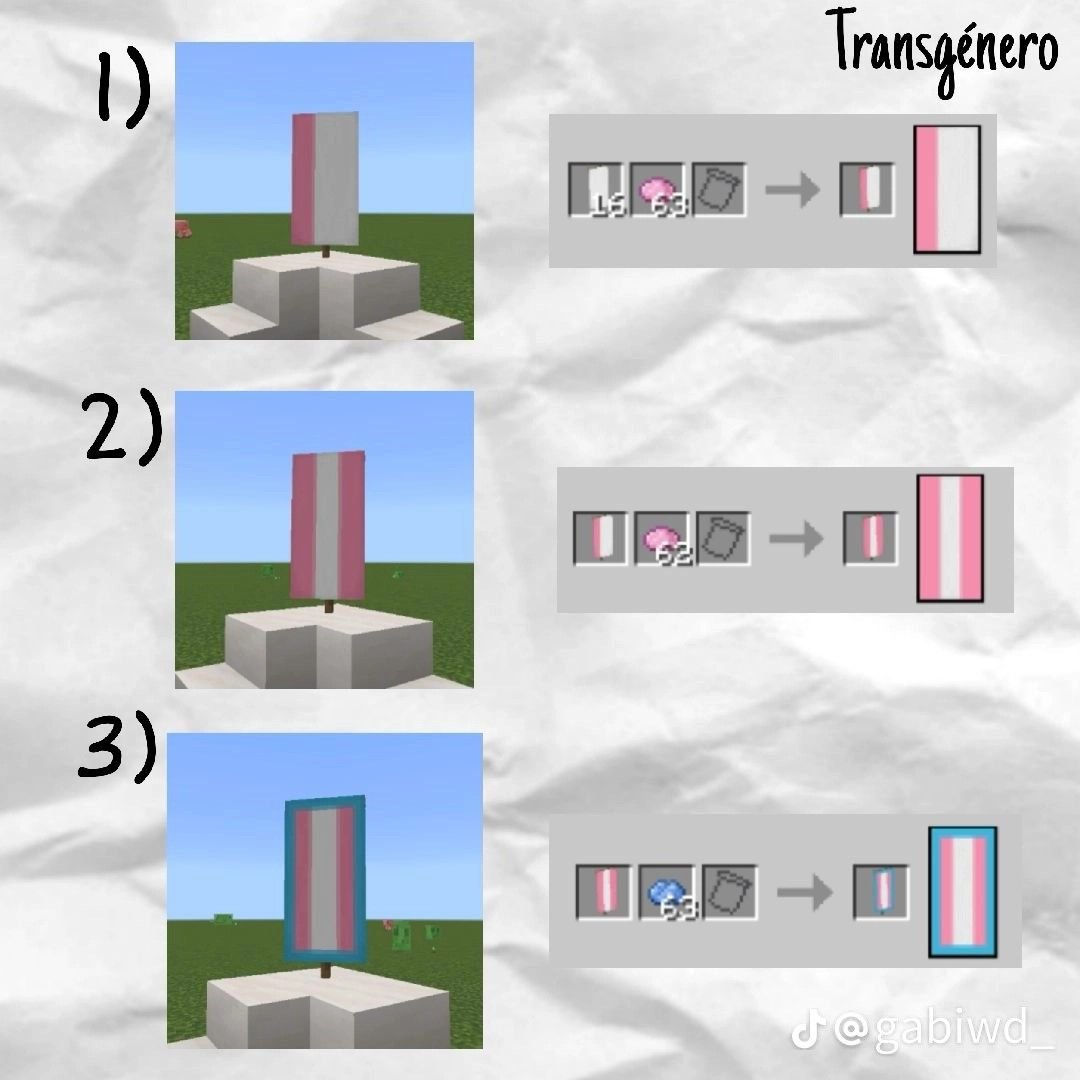
Enter the loom, a game-changer for banner design. The loom simplifies the process dramatically, allowing you to combine a banner, dye, and an optional banner pattern item (like a flower charge or a skull charge) in a dedicated interface. The loom interface visually presents all available patterns, letting you preview your design before committing. It’s intuitive, efficient, and encourages experimentation. You can layer multiple patterns, applying different dyes for each layer, to create incredibly complex and unique designs. The possibilities are truly endless, limited only by your imagination and the 6-layer design limit.
If you’re eager to experiment with designs before committing your in-game resources, you might want to Explore our MC banner generator to prototype ideas. It’s a fantastic way to visualize complex patterns without wasting a single dye or piece of wool in your world.
Unfurling Your Masterpiece: Placing and Interacting with Banners
Crafting a stunning banner is only half the journey; the other half is showcasing it effectively. Banners are surprisingly versatile in how they can be placed and interacted with in your Minecraft environment.
Where and How to Place Them
Placing a banner is as straightforward as it gets. Simply hold the banner in your hand and right-click on the desired block face. They can adorn almost any surface:
- Walls and Fences: A classic display method, perfect for crests, flags, or decorative elements.
- Ground: Banners will stand upright, perfect for marking paths or specific spots.
- Water: Uniquely, banners can float on water surfaces, adding a dynamic, rippling effect to aquatic builds.
Once placed, banners have a non-solid hitbox, meaning you can walk right through them. This characteristic opens up exciting possibilities for creating hidden passages or decorative elements that don't impede movement.
Dynamic Interaction: Rotation and Removal
- Rotation: Want to adjust the orientation of your banner? Simply right-click on a placed banner while it's in your hand (or any item, or even an empty hand), and it will rotate. This minor detail allows for precise aesthetic alignment, crucial for creating cohesive designs.
- Removal: To pick up a placed banner, just left-click it as you would any other block. It will drop as an item, ready to be moved or stored.
Advanced Display Mechanics (Java Edition Insights)
While not explicitly a 'display' mechanic in the traditional sense, some advanced server-side commands can manipulate how banners appear or behave under certain conditions, primarily in Java Edition. For instance, server owners or command block enthusiasts might experiment with /execute commands to create banners that change color based on time of day, or fade in and out with configurable distances and timers. These are typically more advanced server-side applications rather than core gameplay mechanics for individual players, but they highlight the deep potential for creative expression in specialized contexts.
Beyond Decoration: The Multifaceted Uses of Minecraft Banners
While their aesthetic appeal is undeniable, banners in Minecraft offer a surprising array of practical applications. They are tools for communication, organization, and even strategy.
1. Decorative Flair: Elevate Your Aesthetics
This is often the first use players discover. Banners can transform dull walls into vibrant tapestries, act as flags atop castles, or serve as the insignia for your grand builds. Their waving animation adds a subtle touch of life to static structures.
- Window Curtains: Their non-solid hitbox and flowing nature make them perfect for creating faux window curtains or drapes in larger builds.
- Shop Signs: Create custom logos for your in-game shops, making them stand out in bustling server markets.
- Secret Passages: Their ability to be walked through means you can place them in front of hidden entrances, effectively masking secret areas while still allowing easy player access.
- Tapestries & Art: Design elaborate patterns to serve as wall art in your homes, libraries, or grand halls.
2. Signaling & Communication: Guiding and Warning Others
In multiplayer worlds, banners become an invaluable communication tool, especially when players are spread across vast distances.
- Waypoints: Place distinct banners at important landmarks, resource nodes, or community hubs to guide new players or mark return paths. A simple arrow design can point to a key location.
- Boundary Markers: Define property lines, territory edges, or safe zones with clearly designed banners. A red banner with a "no entry" symbol can effectively warn players away from private areas.
- Warning Signs: Use skull or creeper patterns on banners to indicate dangerous areas, mob spawners, or traps.
- Meet-up Points: Design a unique banner as a server-wide rallying point for events or gatherings.
3. Organizational Power: Keeping Your World Tidy
Banners are excellent for bringing order to the chaos of large inventories, sprawling bases, or complex server factions.
- Chest Labeling: Instead of using signs, place a mini-banner above each chest that visually represents its contents (e.g., a pickaxe for tools, a wheat sheaf for crops). This makes inventory management quick and intuitive.
- Faction Flags: On role-playing or faction-based servers, banners are essential for representing your group's identity, territory, and allegiance. A unique faction banner can inspire pride and deter rivals.
- Rank Indicators: In server builds or administrative areas, banners can signify different player ranks or roles, adding a visual hierarchy to your community.
4. Customizing Your Defenses: Shield Integration
This is a favorite among players who value both aesthetics and functionality. You can transfer a banner's design directly onto a shield.
How it works:
Simply place a shield and a banner (with your desired design) into a crafting grid. The result is a shield bearing the banner's pattern. This is a one-time transfer; the banner is consumed in the process. This allows you to personalize your combat gear, matching your shield to your faction's flag or your personal crest.
5. Efficient Design Replication: Copying Banners
If you've spent significant time perfecting a banner design, you don't want to repeat the entire process for every copy. Thankfully, Minecraft offers an easy way to duplicate designs.
How it works:
Place two banners of the same base color into a crafting grid. One banner should have the design you want to copy, and the other should be a blank banner of the same base color. The blank banner will inherit the design. This is incredibly useful for mass-producing flags for a castle wall or uniform markers for a large territory.
6. Mapping Your World: Banner Map Markers (Java Edition)
For Java Edition players, banners offer a powerful navigational feature: the ability to act as custom map markers. This significantly enhances exploration and orientation within vast worlds.
How it works:
- Place Your Banner: First, place a banner on the ground (it must be placed on a block, not free-floating on a wall).
- Use a Map: Hold a map in your hand and right-click the placed banner. A colored marker will appear on your map, matching the base color of the banner.
- Name Your Marker: To make the marker even more useful, rename the banner using an anvil before you place it and mark it on your map. The name you give the banner will then appear on the map when you hover over its marker. This is perfect for labeling specific locations like "Gold Farm," "My Base," or "Village Store."
- Remove a Marker: To remove a banner marker from your map, simply right-click the placed banner with the map in hand again.
This feature is invaluable for large-scale exploration, marking key points of interest, or setting up a personal fast-travel network within your map view.
Mastering Your Canvas: Advanced Banner Mechanics & Best Practices
Beyond the core uses, a few more mechanics can refine your banner-using experience. Plus, a seasoned player always has a few tricks up their sleeve.
Washing Away the Old: Resetting Banner Patterns
Made a mistake? Or perhaps you want to reuse a banner for a new design without starting from scratch? Minecraft offers a unique "washing" mechanic.
How it works:
Take your patterned banner and use it on a cauldron filled with water. Each use will remove the last applied pattern layer and consume one-third of the cauldron's water. This allows for precise pattern correction or progressive removal of designs. You can essentially "undo" your patterns layer by layer, though you can't restore dyes lost in the process.
Trading Banners: A Server Economy Aspect
Banners, especially those with intricate or rare patterns, can be traded with other players. On active servers, custom banners might become valuable commodities, representing unique artistry or prestigious faction symbols. This adds another layer of interaction and economy to multiplayer gameplay.
Expert Tips for Banner Brilliance
- Plan Your Layers: With up to 6 layers of patterns, planning is key. Sketch out your design on paper or use an online banner generator before heading to the loom.
- Base Color Matters: Remember, the base color is crucial for design application and map markers. Choose it intentionally.
- Contrast is Key: When layering patterns, ensure there’s enough contrast between colors for the design to be legible from a distance.
- Less Can Be More: While complex designs are impressive, sometimes a simple, bold pattern communicates a message more effectively. Don't overdo it if clarity is your goal.
- Coordinate with Builds: Integrate your banner designs with the architectural style and color palette of your builds for a cohesive look. A medieval castle might favor heraldic banners, while a modern city could use sleek, minimalist designs.
Common Questions About Minecraft Banners
Let's address some typical queries that pop up about these versatile items.
Q: Can banners be broken by mobs?
A: No, banners have a non-solid hitbox and cannot be destroyed by mobs, players, or most environmental factors like falling blocks or explosions (unless the block they are attached to is destroyed). They are quite resilient!
Q: Do banners decay over time?
A: No, once placed, banners are permanent until a player intentionally breaks them. They do not decay or despawn.
Q: Are banner designs cross-platform?
A: Generally, yes. A banner designed in one version (e.g., Java) will appear the same in another (e.g., Bedrock) if the pattern components exist in both. However, the mechanics of applying designs might differ slightly (e.g., the loom is more prevalent and refined in recent versions across both, but older Bedrock might have slightly different crafting table recipes for some patterns). Map marker functionality is currently Java Edition exclusive.
Q: Can I use custom images on banners?
A: No, Minecraft banners are limited to the predefined patterns available through the loom and crafting recipes, combined with the various dye colors. You cannot upload external image files to display on banners.
Q: What's the maximum number of patterns I can apply?
A: You can apply up to 6 different pattern layers to a single banner. This allows for a remarkable degree of complexity.
Your Canvas Awaits: Unleash Your Banner Creativity
From personalizing your shield to meticulously mapping your server, Minecraft banners offer an unparalleled blend of practical utility and creative expression. They are the flags that tell your story, the markers that guide your journey, and the artistic touches that elevate your builds from functional to fantastic.
Now that you're equipped with the knowledge of how to craft, design, place, and utilize banners in every conceivable way, it's time to gather your wool, dyes, and loom. Go forth and unfurl your imagination across the vast expanse of your Minecraft worlds and servers. Your legacy, beautifully designed and proudly displayed, awaits.